Smartpoint Desktop v12.0 – WebView2 SDK Integration Guide
With Smartpoint Desktop v12.1, CefSharp has been removed from Smartpoint Desktop. All UI or functionality that is dependent on CefSharp needs to be modified to use WebView2.
WebView2 requirements
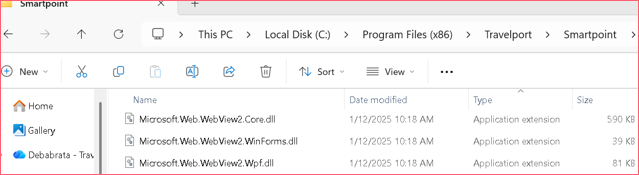
WebView2 initialization requires the WebView2 SDK DLLs to be present in the Smartpoint Desktop installation directory. • If these DLLs are accidentally deleted or missing during installation, WebView2 will not launch. When users try to open a browser control, the following message appears.
Migration checklist
Customers upgrading to Smartpoint 12.1 should:
-
Remove any direct or transitive dependency on CefSharp assemblies.
-
Stop using deprecated SDK methods that previously relied on CefSharp behavior.
-
Validate all browser-based workflows using WebView2.
-
Remove CefSharp-related configuration entries.
-
Refactor custom UI or browser logic assuming CefSharp-specific events or methods.
Opening a Non-Interactive Webpage
To open a non-interactive webpage (i.e., no communication between the Smartpoint SDK and the webpage), use one of the methods below:
Method 1: Using SmartWebView2BrowserControl
var window = UIHelper.Instance.CreateNewSmartBrowserWindow("BrowserWindow1");
var browser = new SmartWebView2BrowserControl();
window.Content = browser;
browser.NavigateTo("http://travelport.com");
window.ShowDialog();
Method 2: Modeless Browser Launch
UIHelper.Instance.LaunchWebBrowser(new Uri("http://travelport.com"));Method 3: Modal Browser Launch
UIHelper.Instance.LaunchWebBrowser(new Uri("http://travelport.com"), true);Opening an Interactive Webpage
An interactive webpage communicates with the Smartpoint SDK by sending and receiving instructions. For example, a booking tool webpage may request:
-
Current Work Area Code
-
Record Locator
-
Serialized Itinerary (JSON)
-
Host Command Submission
Sample Methods (C#)
public string GetCurrentWorkarea()
{
    return UIHelper.Instance.CurrentTEControl?.Connection?.HostUserSettings?.CurrentWorkArea ?? string.Empty;
}

public string GetCurrentRecordLocator()
{
    return PnrHelper.Instance?.CurrentPnrViewerControl?.BookingFile?.RecordLocator;
}

public string GetCurrentItinerary()
{
    var segments = PnrHelper.Instance?.CurrentPnrViewerControl?.BookingFile?.Segments;
    return segments?.Any() == true ? Serializer.Serialize(segments) : string.Empty;
}

public void SubmitToTerminal(string command)
{
    CoreHelper.Instance.SendHostCommand(command, UIHelper.Instance.CurrentTEControl, true);
}
Steps to Enable SDK-Webpage Communication with WebView2
-
Create a new plugin project.
-
Add a Plugin.cs file inheriting from HostPlugin.
-
Define a JsCallBack class with attributes
[ClassInterface(ClassInterfaceType.AutoDual)]and[ComVisible(true)]. -
Instantiate SmartWebView2BrowserControl and ISmartPointWindow.
-
Create a WebView2HostObject with a name and an instance of JsCallBack.
-
Pass the webpage URL to the NavigateTo method.
-
Call the Show method to launch the window and load the URL.
If an existing plugin uses CefSharp, it must follow the same approach to migrate to WebView2.
Example: HTML Page (gsp.html)
-
Fetches current work area
-
Fetches current record locator
-
Fetches current itinerary
-
Sends terminal command
JavaScript uses window.callbackobj to invoke SDK methods.

gsp.html code
<html>
    <head>
        <title>Index</title>
        <script type="text/javascript" >
            document.addEventListener('DOMContentLoaded', function() {
                refresh();
            });

            function refresh(){
                refreshCurrentWorkArea();
                refreshCurrentRecordLocator();
                refreshCurrentItineraries();
            }

            function refreshCurrentWorkArea() {
                // get current work area
                var currentWorkArea = invoke(window.callbackobj, 'getCurrentWorkarea');
                document.getElementById('currentWorkArea').value = currentWorkArea;
            }

            function refreshCurrentRecordLocator() {
                // get current record locator
                var currentRecordLocator = invoke(window.callbackobj, 'getCurrentRecordLocator');
                document.getElementById('currentRecordLocator').value = currentRecordLocator;
            }

            function refreshCurrentItineraries() {
                // get current itineraries
                var currentItineraries = invoke(window.callbackobj, 'getCurrentItinerary');
                document.getElementById('currentItineraries').value = currentItineraries;
            }

            function executeTerminalCommand() {
                // get terminal command
                var terminalCommand = document.getElementById('terminalCommand').value;
                invoke(window.callbackobj, 'submitToTerminal', terminalCommand);
            }

            function invoke(obj, method, args) {
                // invoke method
                if (!obj) return;
                if (!obj[method]) return;

                if (!args) return obj[method]();

                return obj[method](args);
            }
        </script>
    </head>
    <body>
        <h1>SPD Info</h1>
        <!-- Table to display -
         columns: name, empty
         rows: [current work area in readonly textbox, refresh button,
         current record locator in readonly textbox, refresh button,
         current itineraries in readonly textaread, refresh button,
         terminal command in textbox, execute button]
         -->
        <table border="1">
            <tr>
                <td>Current Work Area</td>
                <td><input type="text" readonly="readonly" id="currentWorkArea" /></td>
                <td><input type="button" value="Refresh" onclick="refreshCurrentWorkArea()" /></td>
            </tr>
            <tr>
                <td>Current Record Locator</td>
                <td><input type="text" readonly="readonly" id="currentRecordLocator" /></td>
                <td><input type="button" value="Refresh" onclick="refreshCurrentRecordLocator()" /></td>
            </tr>
            <tr>
                <td>Current Itineraries</td>
                <td><textarea readonly="readonly" id="currentItineraries"></textarea></td>
                <td><input type="button" value="Refresh" onclick="refreshCurrentItineraries()" /></td>
            </tr>
            <tr>
                <td>Terminal Command</td>
                <td><input type="text" id="terminalCommand" /></td>
                <td><input type="button" value="Execute" onclick="executeTerminalCommand()" /></td>
            </tr>
        </table>
    </body>
</html>
Sample Plugin Project
- 0805.CustomSDKPlugin: Launches the gsp.html page (code provided above) and handles SDK-webpage communication.
Plugin.cs: Contains
ShowWindowmethod to create and launch the WebView2 browser.Copyusing System;
using System.Collections.Generic;
using System.Linq;
using System.Text;
using System.Threading.Tasks;
using Travelport.Smartpoint.Common;
using Travelport.Smartpoint.Controls;
using Travelport.Smartpoint.Helpers.Core;
using Travelport.Smartpoint.Helpers.UI;
namespace CustomSDKPlugin
{
/// <summary>
/// Plugin for extending Smartpoint application
/// </summary>
[SmartPointPlugin(Developer = "Smartpoint Desktop Team",
Company = "Travelport",
Description = "Custom plugin for communicating with Smartpoint SDK and Webpage",
Id = "35221a98-7da5-49dc-9704-80694cc97933",
Version = "1.0.0.0")]
public class Plugin : HostPlugin
{
private ISmartDialogWindow window = null;
/// <summary>
/// Constructor
/// </summary>
public Plugin()
{
}
public override void Execute()
{
// Attach a handler to execute when the Smartpoint application is ready and all windows are loaded.
CoreHelper.Instance.OnSmartpointReady += this.OnSmasrtpointReady;
}
private void OnSmasrtpointReady(object sender, CoreHelperEventArgs e)
{
CoreHelper.Instance.TerminalCommunication.OnTerminalPreSend += TerminalCommunication_OnTerminalPreSend;
}
private void TerminalCommunication_OnTerminalPreSend(object sender, TerminalEventArgs e)
{
if (e.TerminalEntry.Equals("#OpenWebPage", StringComparison.InvariantCultureIgnoreCase))
{
ShowWindow();
UIHelper.Instance.ShowMessageInTerminal("if any message to be didplayed in terminal", UIHelper.Instance.CurrentTEControl);
e.Handled = true;
}
}
private void ShowWindow()
{
var objCallBack = new JsCallBack();
var hostObject = new WebView2HostObject() { Name = "callbackobj", Object = objCallBack };
var owner = UIHelper.Instance.GetOwnerWindow(UIHelper.Instance.CurrentSmartTerminalWindow);
var browserWindow = UIHelper.Instance.CreateNewSmartpointWindow("CustomSDK");
browserWindow.Title = "Custom SDK";
browserWindow.NoClose = false;
var wb = browserWindow.Content as SmartWebView2BrowserControl;
if (wb == null)
{
wb = new SmartWebView2BrowserControl();
browserWindow.Closed += delegate
{
wb.Close();
};
browserWindow.Content = wb;
}
browserWindow.Owner = owner;
//pass the host object values to the browser control
wb.HostObject = hostObject;
var url = $"{Environment.CurrentDirectory}\\gsp.html";
wb.NavigateTo(url);
browserWindow.Show();
}
}
}JsCallBack.cs: Contains methods for SDK-Webpage communication.
Copyusing Newtonsoft.Json;
using System;
using System.Collections.Generic;
using System.Linq;
using System.Runtime.InteropServices;
using System.Text;
using System.Threading.Tasks;
using System.Windows.Threading;
using Travelport.Smartpoint.Helpers.Core;
using Travelport.Smartpoint.Helpers.PNR;
using Travelport.Smartpoint.Helpers.UI;
namespace CustomSDKPlugin
{
[ClassInterface(ClassInterfaceType.AutoDual)]
[ComVisible(true)]
public class JsCallBack
{
/// <summary>
/// Refresh Pnr Viewer
/// </summary>
public void RefreshPnrViewer()
{
UIHelper.Instance.CurrentTEControl.Dispatcher.BeginInvoke(
System.Windows.Threading.DispatcherPriority.Background,
new System.Action(() =>
{
string recordLocator = PnrHelper.Instance.LastPnrRecordLocator;
PnrHelper.Instance.RefreshCurrentBookingFile();
}));
}
public string GetCurrentWorkarea()
{
var workarea = string.Empty;
workarea = UIHelper.Instance.CurrentTEControl?.Connection?.HostUserSettings?.CurrentWorkArea ?? string.Empty;
return workarea;
}
public string GetCurrentRecordLocator()
{
var recordLocator = string.Empty;
recordLocator = PnrHelper.Instance?.CurrentPnrViewerControl?.BookingFile?.RecordLocator;
return recordLocator;
}
public string GetCurrentItinerary()
{
var itinerary = string.Empty;
var segments = PnrHelper.Instance?.CurrentPnrViewerControl?.BookingFile?.Segments;
if (segments?.Any() == true)
{
itinerary = JsonConvert.SerializeObject(segments);
}
return itinerary;
}
public void SubmitToTerminal(string command)
{
UIHelper.Instance.CurrentTEControl.Dispatcher.BeginInvoke(
System.Windows.Threading.DispatcherPriority.Background,
new System.Action(() =>
{
var segments = PnrHelper.Instance?.CurrentPnrViewerControl?.BookingFile?.Segments;
if (segments?.Any() == true)
{
CoreHelper.Instance.SendHostCommand(command, UIHelper.Instance.CurrentTEControl, true);
}
}));
}
/// <summary>
/// Closes the Ndc Window.
/// </summary>
public void CloseNdcWindow()
{
UIHelper.Instance.CurrentTEControl.Dispatcher.BeginInvoke(
System.Windows.Threading.DispatcherPriority.Background,
new System.Action(() =>
{
string recordLocator = PnrHelper.Instance.LastPnrRecordLocator;
PnrHelper.Instance.RefreshCurrentBookingFile();
}));
}
}
}
Deployment Instructions
- Build the 0805.CustomSDKPlugin project.
- Place the DLL in:
C:\Program Files (x86)\Travelport\Smartpoint - Copy
gsp.htmlto the same location. - Launch Smartpoint and enter #OpenWebPage in the terminal.
The working solution (CustomSDKPlugin.zip) is available to download.